

Live in four steps.
The app's home page walks you through these with live checks. Here they are in full, plus how the numbers work.
1. Switch on the popup in your theme
Shopify ships every app embed switched off. From Overture's home page, press Open theme editor: it opens your theme editor with Overture pre-selected. Toggle it on and click Save. Overture re-checks your live theme every minute and ticks the step when it sees the embed active.
Have more than one theme? The checklist has a theme picker next to the button, so you can switch the embed on in an unpublished theme first. App embeds work in every Shopify theme, including vintage ones.
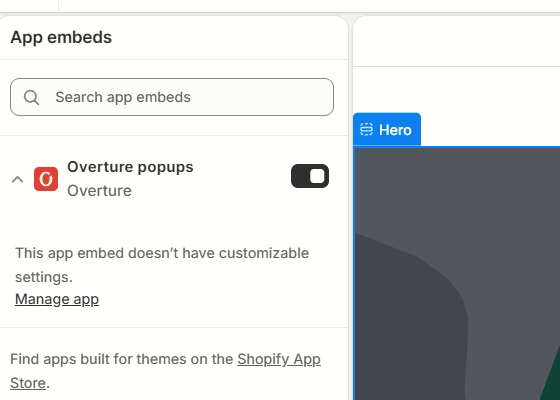
The App embeds panel in the theme editor: Overture popups, toggled on. Watch the 30-second clip.
2. Publish a popup
Press Draft with AI to get a flow written from your store, or pick a template. Edit anything in the editor; the preview on the right is the real widget. Press Publish. One popup is live at a time, or two during an A/B test.
3. Connect Klaviyo
Settings → paste a Klaviyo private API key with list and profile write access, choose the list. Captures made before you connected sync automatically. The key is encrypted and never displayed again.
4. Send the code by email
Overture shows the code on screen and fires a Klaviyo event named Overture Code Unlocked with the code and quiz answers. In Klaviyo: Flows → Create flow → trigger "Metric: Overture Code Unlocked" → add an email containing {{ event.code }} → set it live. Tick "My flow is live" in Overture.
Coming from another popup app
- Run one popup at a time. Switch off the old app's theme embed (or uninstall it) before you publish in Overture, so two popups never stack on the same visit.
- Klaviyo's own sign-up form. If a Klaviyo form is live on your site, pause it or limit it to a page Overture excludes. Overture does the capture; Klaviyo stays the sender of every email.
- Existing subscribers. If a shopper is already in your list, the capture updates their profile with the answers and still mints a code. Nothing is duplicated.
- What setup needs. The theme toggle in step 1, a Klaviyo private key in step 3, and one flow in step 4. No theme code edits, and nothing is left behind if you uninstall.
How shoppers experience it
- A teaser pill appears first; the popup opens after the delay you set, on exit intent, or when they click the pill.
- Closing partway shrinks it to a pill for the rest of the visit. Closing after the code keeps a "Your 10% off" pill until the code expires or they apply it.
- It never shows on checkout, cart or pages you exclude, and respects the "don't show again" windows you set.
- Logged-in customers don't see first-order offers by default (welcome, exit, free shipping, email and SMS, $10 off), since those aren't meant for someone who already has an account. Story, quiz, waitlist, join-the-list and gift-finder flows show to everyone. "Hide from logged-in customers" under When it shows sets it per popup. Preview still shows it to you when you're logged in.
- Locking codes: under Reward, "Lock each code to the shopper who unlocked it" restricts every minted code to that shopper's customer record in Shopify. New shoppers are created in your customer list as subscribers. If Shopify refuses for any reason, the shopper still gets a normal single-use code, so a capture is never lost. The captures table marks locked codes.
- Testing it yourself: once you close it or claim a code, your own browser is inside those windows and the popup stays away, which is correct. Use View as new visitor on the app's home page to open your storefront with that history forgotten, or Preview, which opens on every page and never remembers anything.
How attribution counts
Attributed: the order used a code Overture minted. Assisted: no code, but the buyer's email was captured in the previous 30 days; shown separately, never added to the total. Test and cancelled orders are excluded on real stores. New orders arrive within seconds; a catch-up sync from Shopify runs every few hours and on demand.
How A/B tests work
Start a test between any two popups. Visitors are assigned by a hash of their visitor id, so each sees the same side every time. The scoreboard refuses to call a winner before 100 visitors a side and only calls one at 95% confidence on capture rate. Keep A or Keep B ends the test.
Questions
- Does it send the email with the code?
- No. The code appears on screen, and Overture fires an event into your Klaviyo account so your own welcome flow sends it. Your ESP stays the sender of record.
- Will it slow my store?
- No. The widget is small, loads after your page has drawn, and makes one small request for its settings. Nothing else runs until a visitor interacts. Technical details →
- Can't I just use one code and limit it to a customer segment in Shopify?
- You can, and it stops a code leaking to coupon sites. What it can't tell you is which popup, or which side of a test, produced the order, because every subscriber shares the same code. Overture mints one code per capture, so each order points back to the exact popup. If you also want the code to work only for the shopper who unlocked it, switch on the lock and Overture restricts it to their customer record.
- Do my existing customers see the welcome offer?
- Not by default. Shopify tells the popup when a shopper is logged in to an account, and first-order offers stay out of their way. Story, quiz and list flows show to everyone, and each popup has a switch either way.
- Does attribution prove the popup caused the sale?
- No, and we don't claim it. Attributed means the order used the popup's code, so it came through the popup. Some of those shoppers would have bought anyway. That's why assisted revenue is kept separate and why the A/B scoreboard exists: it tells you which of two flows does better, on the same traffic.
- What about consent?
- The consent text shown to the shopper, the page URL, the time and the network address are stored with every capture, and SMS captures use a full disclosure. Customer deletion requests from Shopify are honoured automatically.
- Can I keep my brand's look?
- Yes. Presets, a "match my theme" button that reads your live theme, and every colour, corner and font choice editable. See looks →
Something else?
Email support@overture.lol with your store domain and what you expected to happen. Replies within one business day.