

Know which orders came through the popup, not just what it collected.
Sign-ups are a cost until someone buys. Overture ties orders back to the popup whose code they used, with a method you can defend.
Two numbers, kept apart on purpose
Attributed means the order used a discount code Overture minted. Codes are single-use and unique to one capture, so an order carrying one could only have come from that popup. This is the headline number.
Assisted means no code was used, but the buyer's email was captured in the thirty days before the order. It's shown separately and never added to the attributed total, because that buyer might have bought anyway.
Locked codes, if you want them. Switch on the lock in the editor and each code is restricted in Shopify to the shopper who unlocked it, so it can't be passed to a friend or posted anywhere. New shoppers are added to your Shopify customers as subscribers. The trade-off is honest: a shopper who checks out with a different email won't be able to apply it, which is why the lock is off until you choose it.
Test orders and cancelled orders never count. Orders arrive the moment they're placed, and a catch-up sync every few hours covers anything missed.
What this is not. Attribution is not proof of lift. A shopper who used the code might have bought without the popup; the code tells you the order came through it, not what would have happened otherwise. Measuring lift needs a comparison, which is what the A/B scoreboard gives you between two flows.
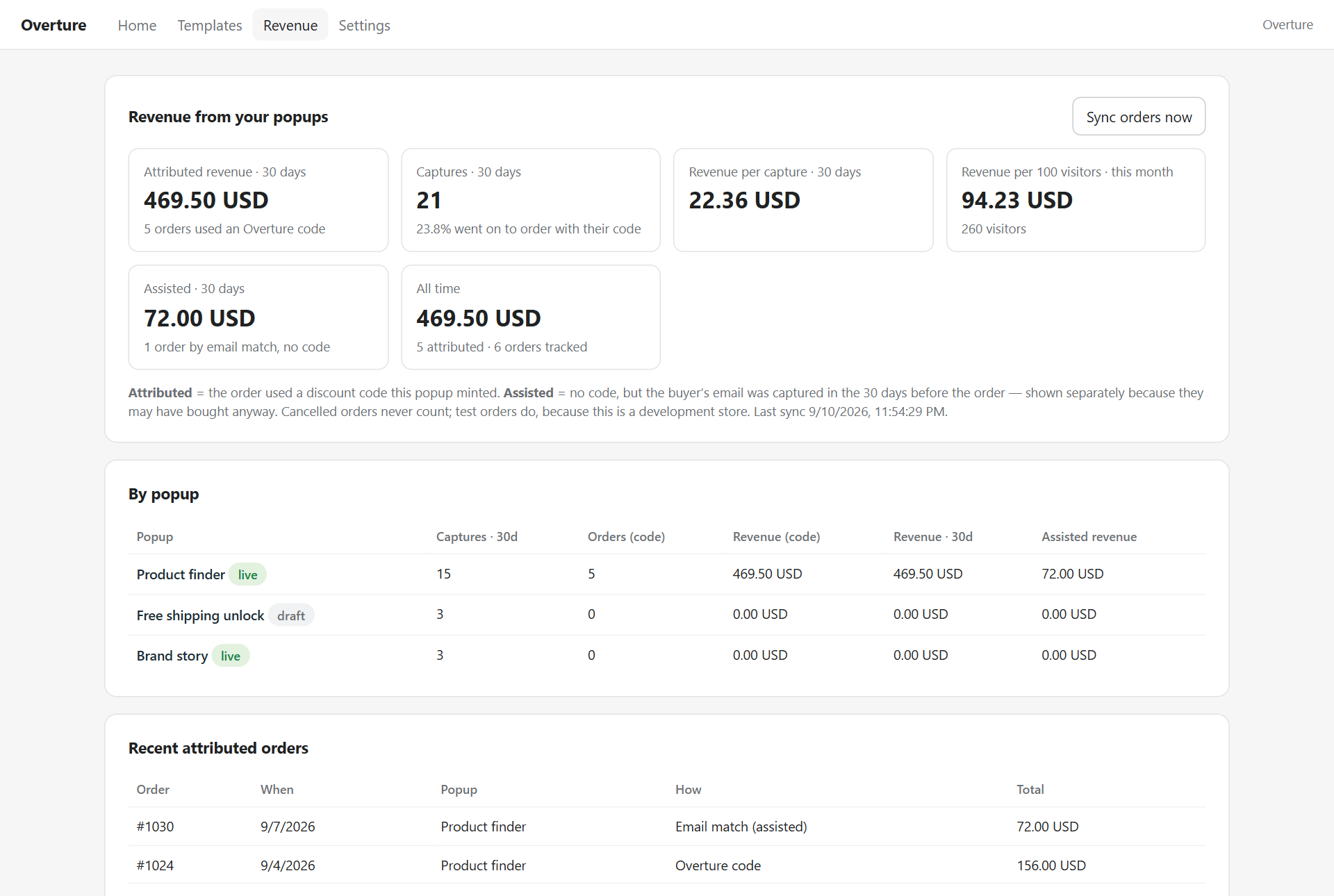
What the Revenue tab shows
Per popup
Captures, orders and revenue for each flow, so you see which one makes money rather than which one collects the most emails.
Per capture and per visitor
Revenue per capture tells you what a sign-up is worth. Revenue per hundred visitors tells you what the popup is worth against your traffic.
Recent attributed orders
Order number, date, popup and how it was attributed. Open any of them in Shopify.
Order data is kept to what attribution needs: id, total, codes used and the buyer's email. No addresses, no line items. Customer deletion requests remove the email automatically.